

Mapple - Neighborhood Delivered is a mobile app developed by team of 5 (2 designers and 3 programmers) during our spare times after school and work for 4 weeks, as part of the Google Maps Platform Hackathon. I was in charge of UX/UI design with 1 other team member and worked on the UX Research, Wireframes, Prototype, and Design System, as well as Illustrations for any visual assets as needed.
The project is based on our group discussion about our experience with Google Maps. Our diverse backgrounds allow us to see Google Map' shortcomings as an app that is meant to connect users with local experience. The app isn't lacking any tools, as it is a powerful app with a huge database, but the app's complicated user-experience was where saw a huge potential for us to rethink how we can approach connecting users to their local neighborhood.
The Problem
Although we did not find the existing Google Map application lacking in functionality, we found an opportunity for improvements in its usability and engagement. Mainly, the current application provided a list of nearby places in a complex way that included number of unrelated information. It also did not have a lot of option for personalization, which then led to overall lack of engagement of the recommendation system.
The Solution
Mapple revamps your user experience as it will customize your map experience by asking about your current preferences, such as how you are traveling, who you are with, what's your budget, and coming up with the best matching place. Mapple displays what type of desire can be satisfied at that destination in a more organized, engaging way.
The Double Diamond Design Process
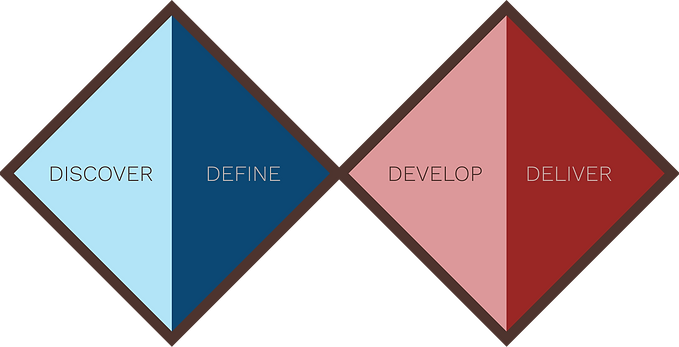
Discover Stage
User Pain Points
Through discussions, the team has recognized some major pain points of the existing Google Maps application. The team included 5 members in the early to late 20s with various backgrounds (Tech, Hospitality, Art) from all around the nation (Las Vegas, New York City, New Jersey) which gave an advantage of varying perspective of the application's usability.

Define Stage
User Persona
Basing upon our previous discussion and the pain points we discovered, I made the User Persona as a representative fictional user who might wish to utilize Google Map for exploring the local areas. This would help us envision our target user more clearly and keep us in track as we formulate most effective solutions for our pin-pointed challenges.

User Journey Map
With the user persona mind, we developed a user journey map to clearly understand the actions the user might take to reach her goal strictly from her perspective in detail. This reflection on the user's feelings and pain points in each of the main steps helped us realize what to focus on when making improvements and adjustments so that our design becomes truly user-centric and user-friendly.

Develop Stage
The Sketch
With the information obtained and ideation made from previous stages, we enter the Develop Stage with some initial sketches. We used FigJam, Figma's Whiteboard platform to collaboratively create sketches and brainstorm rough ideas with an open mind. Another teammate and I was the main contributor but we invited the other members who are most focused on technical sides as well to share some feedbacks and suggestions. We discussed our design directions and options with inspirations from other applications with similar design approaches.

Digital Wireframe
After the initial rough sketches, we continued to build more structured wireframes on FigJam. We constantly made changes and updates to our prototypes as we go from continued feedbacks and discussions among the team members.


Deliver Stage
The Design System
As a preparation for our final designs for the Deliver Stage, we agreed as a team the importance of settling on the design system first and foremost for clarity and consistency in final designs. Inspired by Material 3, Google's open-source design system, we spent most of the remaining time creating our own design system for Mapple. Below are some examples from our comprehensive design system, including illustrations for Mapple created solely by myself.


The Prototype
Based on the completed design system and our wireframe from previous stage, we quickly worked on our final design as an interactive prototype on Figma. Our developers used this prototype as a reference for the development of our application for the hackathon submission. You can try our interactive prototype below.


Our final submission received the Honorable Mention award for the User Experience category at Google Maps Platform Hackathon, winning $1,000 USD and a virtual coffee chat with Google Maps Platform team members. For more information, you can check our hackathon project site here.
Conclusion
My Learnings
-
It was my first time working on UX/UI design as a team and within a certain time limit as well as first time entering a hackathon. It was truly a valuable experience as a designer to be able to work on a design collaboratively and to see our design gets developed into an actual product in the end.
-
My team put a huge emphasis on building a comprehensive design system. I was able to familiarize myself with and learn a lot about the industry standard on design system as we took the example from Google's Material 3.
-
As we mainly used Figma from most of our design works including brainstorming, I have learned more about different aspects of Figma and got to utilize the functions more efficiently.
-
It was more goal-oriented than my previous projects that I worked on my own at my own pace. I learned about both the benefits and the limitations that come from having deadlines and collaborators and what it takes to make a tangible end-product.
Going Forward
-
Put more emphasis on earlier phase and spend more time on research and ideation to be clear with the main issues and solutions.
-
Keep the first version of the design simple so that the basis of the product can have high quality UX/UI design in a given time. Add on additional features later.
Thank You!
Thank you for your time reviewing my case study!
You can find more of my work on my design portfolio, https://yoonseomok.wixsite.com/design
For business inquiries or feedbacks, you can contact me via email on octis.em@gmail.com
Thank you!